
Intro
The first question every new maker asks is how many watts they actually need. Laser power decides both how thick you can cut and how fast you can engrave, and buying too little frustrates you while buying too much dents your budget.
This guide compares 40W, 60W, and 100W CO2 machines for real craft work, shows what each wattage does well, and helps you match power to the projects you want to sell. Read it before you spend, because the right choice saves you from a costly upgrade six months later.
What wattage actually means
Wattage is the raw energy leaving the tube, and it splits into two jobs. For engraving, more watts mostly means more speed: a 100W tube can burn the same image faster than a 40W tube at equal quality. For cutting, more watts means thicker material in a single pass.
The key idea is that you can almost always engrave with any wattage by slowing down, but you cannot cut thick stock with a tube that lacks the power to reach the bottom of the cut. So think of wattage as a ceiling on cut depth and a multiplier on engrave speed, not as a quality dial on its own.
A beginner laser power choice should be based on the thickest thing you plan to cut, not the prettiest thing you plan to engrave. Engraving detail comes from focus, DPI, and settings, not from raw watts.
40W: the starter craft machine
A 40W CO2 tube is the classic entry point for home businesses and Etsy sellers focused on engraving.
- Engraving: excellent on wood, acrylic, leather, and coated items at 200 to 400 mm/s.
- Cutting: up to about 3 to 4 mm plywood or acrylic in one or two passes; thicker stock needs multiple slow passes.
- Best for: personalized gifts, tumblers, signs, and light wood tags where cutting is thin.
- Limitation: slow on big fills and unable to cut thick hardwood or dense acrylic cleanly.
If your whole plan is engraving and occasional thin cutting, 40W is enough and keeps the price and footprint small. Many successful shops run a 40W for years before upgrading.
60W: the balanced workhorse
A 60W tube is the sweet spot for most small businesses, balancing speed and cut capability without a huge leap in cost.
- Engraving: roughly 30 to 50 percent faster than 40W on the same job, great for batch orders.
- Cutting: cleanly handles 5 to 6 mm plywood and acrylic, and 8 mm with care, in one to two passes.
- Best for: sellers who both engrave and cut, plus anyone doing volume work where speed pays rent.
- Limitation: still not ideal for thick hardwood or large acrylic sheets above 10 mm.
The 40W vs 60W laser decision usually comes down to whether you cut regularly. If cutting is more than a rare task, 60W earns its keep quickly through saved time.
100W: the production machine
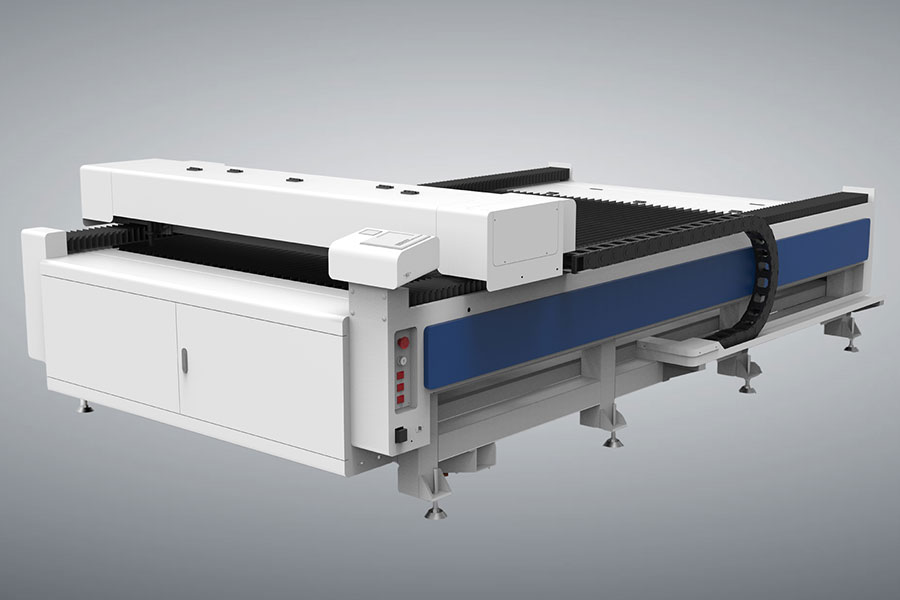
A 100W tube is for makers who treat the laser as a production tool, not a hobby.
- Engraving: very fast, which matters when you run hundreds of items a week.
- Cutting: handles 10 to 12 mm acrylic and plywood, and even thicker with multi-pass, plus denser hardwoods.
- Best for: busy shops, sign makers, and anyone cutting thick stock daily.
- Trade-off: bigger bed and tube, higher power draw, and a higher price that only makes sense at volume.
For craft laser power needs that are mostly gifts and small signs, 100W is often more than required. But if cutting thick acrylic is core to your products, it removes the slow multi-pass struggle entirely.
Match power to your projects
List the three products you most want to sell, then check the thickest material in that list. Engraving gifts on slate, wood, and leather needs only 40W. Cutting 6 mm plywood signs and 8 mm acrylic tags points to 60W. Slicing 12 mm acrylic or hardwood jigs daily points to 100W.
Resist buying watts you will never use just because they feel safer; the money is better spent on a larger bed, better exhaust, or a rotary attachment for tumblers. The right craft laser power is the smallest tube that clears your thickest cut with margin to spare.
Upgrade paths and cost
Most CO2 tubes are replaceable, so a common path is to start at 40W and swap in a 60W or 80W tube later if your power supply and cooling support it. Check your controller and PSU rating before assuming a bigger tube will run.
Factor in the hidden costs that scale with wattage: bigger chiller or water pump, stronger exhaust fan, and more workshop space. A 100W setup is a serious piece of equipment, while a 40W unit tucks into a corner. Choose the level your order volume genuinely justifies, and let growth pull you upward rather than buying ahead of it.
Practical speed and power starting points
Once you have picked a wattage, the next question is what numbers to type into the software. These are safe starting points for common craft jobs on a CO2 machine; always run a test scrap first because every tube ages differently and outputs a little less power each month.
- Light wood engraving (pine, MDF): 20 to 30 percent power at 300 to 500 mm/s, 300 to 500 DPI for photos and fine text.
- Deep wood burn for signs: 40 to 60 percent power at 150 to 250 mm/s, single pass with air assist to clear smoke.
- Acrylic cutting, 3 mm: a 40W tube around 25 to 35 percent at 10 to 15 mm/s; a 60W tube around 20 to 30 percent at 20 to 30 mm/s.
- Acrylic cutting, 6 mm: a 60W tube at 30 to 45 percent, 12 to 20 mm/s, one or two passes.
- Leather engraving: 15 to 25 percent power at 200 to 350 mm/s so you mark the surface without cutting through.
Notice that cutting speeds are far slower than engraving speeds. Cutting is about delivering enough energy to reach the bottom of the stock, while engraving is about spreading energy across a surface. A common beginner error is using engraving speed for a cut and ending with a scored line instead of a separated part.
Run a power test card
The fastest way to learn your machine's real limits is a test card, and it takes about ten minutes. Draw a grid of small squares that vary power in 5 percent steps down one axis and speed in even increments down the other, then run it on the exact material you plan to sell.
Label the best-looking cell and write the settings on the back of the scrap. Do this once per material and wattage combination, and you will stop guessing when a new order arrives. It also shows you the point where more power just adds scorching instead of a better mark, which protects both your wood and your schedule. Keep the cards in a binder so any helper in your shop can match a result without re-learning the machine from scratch.
Plan your bed time, not just your watts
Most makers underestimate how much of their day is loading and unloading, not lasered. A 100W tube cuts a 6 mm sign in seconds, but a 40W tube may need two slow passes that triple the bed time for the same part. When you price a product, the watts you own change your true labor cost more than the sticker price suggests.
Batch similar jobs together so the machine stays warm and you are not re-focusing between every item. Engraving a dozen coasters in one layout is faster than twelve separate runs, and it uses the bed more efficiently. Think of wattage as buying back your own hours: the right amount is the one that keeps your per-item time low enough to hit the price your market will pay.
Frequently Asked Questions
Is higher wattage better for engraving detail?
Not really. Detail comes from focus, DPI, and material prep. Higher watts mainly let you engrave faster, not finer, so a 40W can match a 100W on quality.
Can a 40W laser cut acrylic at all?
Yes, up to about 3 to 4 mm in one or two passes. Thicker acrylic needs slower multi-pass work or a more powerful tube to cut cleanly.
Should a beginner buy 100W to avoid upgrading?
Usually no. A 40W or 60W covers most craft work, and you can upgrade the tube later if your power supply allows. Buy the watts your thickest cut actually needs.
Does more power mean I can use lower DPI?
No, DPI controls resolution and stays independent of wattage. You still pick DPI for the material and detail; watts only change how fast the job runs.
Closing
Picking wattage is really about your thickest cut and your weekly volume, not about chasing the biggest number on the shelf. Once you know your range, it helps to compare the full lineup at Hefei Laser's laser cutter page so you can see how 40W, 60W, and 100W builds compare side by side.

- National hotline: +86-531-86516855/56/57
- Enterprise mailbox:sales@redsaillaser.com
- Address: Room 402E, Tower D, Yinhe Building, 2008 Xinluo Avenue, Shunhua Road Subdistrict, Jinan Area, China (Shandong) Pilot Free Trade Zone


Redsail Tech Co. © 2002-2026. All Rights Reserved.